#Schema Browser, DDL and metadata cache
The Schema view is a lazy tree: connection → database → schema → object group → object → columns. It does not eagerly fetch every column in a warehouse.
#Everyday workflow
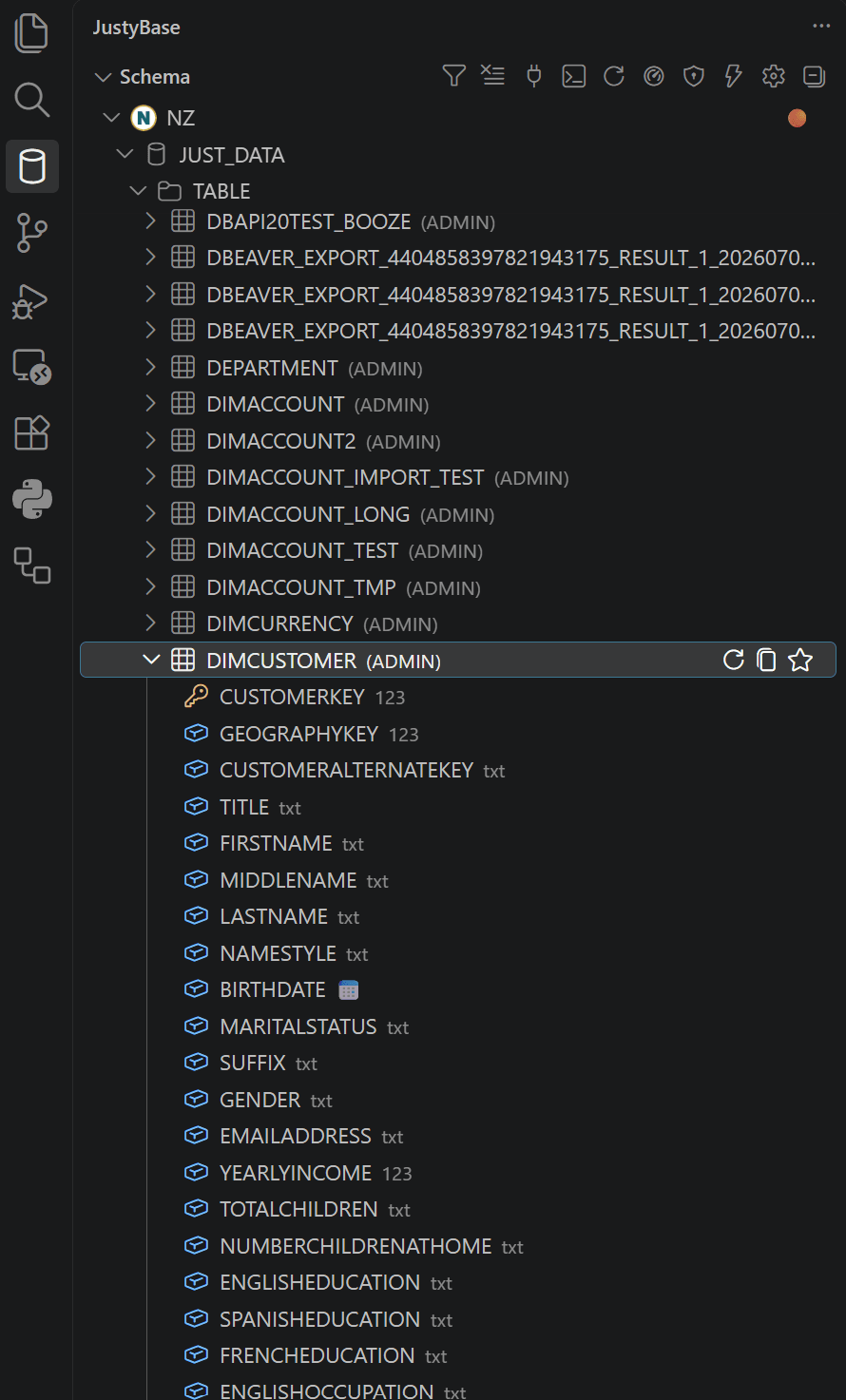
- Connect and expand the database you need.
- Expand a schema and choose Tables, Views, Procedures, External Tables, or another object group.
- Expand an object for columns and type/nullability metadata.
- Use context actions to copy a qualified name, generate DDL, view/edit data, add a comment, compare schema, or add the object to favorites.
- Use Filter Visible Objects in the Schema view toolbar to narrow already loaded object lists by name. This is local and does not run Schema Search; use the clear action to restore the full lists.
- Use Refresh Selected Metadata after a targeted DDL change. Use Refresh Schema after a broad migration or catalog refresh.
#DDL and navigation
Create DDL Code generates a reviewable CREATE statement for supported objects. Go to Table DDL opens the definition for a catalog object. DDL is generated through the selected dialect provider, so identifier quoting, procedure syntax, and external-table clauses vary by database kind.
Qualified names remain intact: DB.SCHEMA.TABLE identifies a three-part object, while DB..TABLE intentionally leaves the schema slot empty for Netezza notation. Quoted identifiers are not uppercased or normalized away.
#Cache behavior
The cache is cache-first, TTL-aware, and layered. Table-like objects (tables, views, nicknames, aliases) share refresh state; a refresh merges current objects instead of replacing unrelated cached entries. When a connection snapshot expires, its in-memory and persisted metadata are discarded before rebuilding, so stale tables cannot seed the new snapshot. Column loading is separate and can be warmed for completion. Disk persistence and cross-window synchronization are enabled by default.
| Action | Scope | Cost |
|---|---|---|
| Expand a node | The selected child level | Low and lazy |
| Refresh selected metadata | Selected database/schema/object | Targeted catalog query |
| Refresh schema | Connection/database catalog | Broad; use after migrations |
| Clear autocomplete cache | Completion cache | Does not delete database objects |
#Schema Refresh Details
For a Netezza connection, open JustyBase: Show Schema Refresh Details from the Command Palette or click the metadata-refresh status item. The command is netezza.showMetadataRefreshDetails. The panel is a read-only diagnostic view: it displays catalog SQL generated by the extension and never accepts or executes SQL supplied by the webview.
The panel follows one connection-scoped full prefetch. It can show database discovery, schemas and type groups, table/view and external-table catalogs, procedures, columns, and external-table columns. The database, schema, object and procedure stages use one shared query runner. The column stage can use the configured justybase.metadata.fullRefreshColumnConnections pool (1 by default, up to 8) for independent databases while keeping each database's catalog scans serial. A statement can remain Planned when its cache layer is already valid or when there is no external table to inspect; planned work may then become Skipped. This is the broad refresh path used after Refresh Schema, not a replacement for ordinary lazy expansion.
Each catalog statement has one of these states: Planned, Queued, Running, Completed, Failed, or Skipped. The filters also include Timeout (an error message containing a timeout) and Slow (more than five seconds). Sort by execution time, most-recent start time, or queue wait. The panel reports rows and accumulated time for table/view and external-object queries, the corresponding totals for column queries, total refresh elapsed time, and the longest individual SQL statement. Elapsed time stops at the terminal refresh event; the longest-SQL value remains the maximum even after shorter statements finish.
Each connection card has Repeat full metadata refresh. It clears that connection's in-memory metadata and starts the complete Netezza prefetch through netezza.refreshSchema; use it when a broad retry is more useful than a targeted refresh. Refresh Selected Metadata, database/type-group refreshes, and object refreshes are selective operations. They normally update only the selected catalog layer and are not the same full-refresh lifecycle shown here.
After all catalog queries succeed, the refresh verifies objects that did not return columns once per affected database. Objects that disappeared during the refresh are removed; surviving or unconfirmed objects receive an explicit empty column layer. Such a snapshot is complete with warnings, is cached normally, and cannot cause editor keystrokes to repeat the full refresh. A genuinely incomplete snapshot means that a required catalog query failed or timed out.
Automatic full-refresh failures use a connection-scoped circuit breaker: one retry is allowed after five minutes, then automatic retries stop for the current session. Refresh Schema remains available as an explicit retry and resets the circuit.
Details are retained only for the latest refresh per connection in the current VS Code extension-host session/window. They are not a historical audit log and are not persisted as part of the disk metadata cache. The disk cache may synchronize between windows, but the live diagnostics panel does not. Full-refresh diagnostics are implemented for Netezza; companion database providers have their own metadata and refresh boundaries.
#When a table is missing
- Verify the selected database and schema.
- Check database privileges and whether the object is a synonym/external table rather than a regular table.
- Refresh the selected metadata, then the full schema if necessary.
- Search by object or column name with Schema Search. The quick tree filter is intended only for narrowing the objects currently shown in expanded groups.
- Check the Output panel for catalog query errors and cache statistics.
#Favorites and recent objects
Favorites preserve a route to objects, SQL snippets, folders, notes, and optional Copilot context. Recent objects are a convenience index and can disappear when their source connection is removed. See History and Favorites for the workspace file and note policy.